
AVD Hybrid with Hydra: Cloud Brains, On-Prem Muscle, Zero Babysitting
November 10, 2026
The Question That Used to End Every AVD Meeting
Every Azure Virtual Desktop pitch eventually reaches the same moment. Someone from compliance leans forward and asks: “And where exactly will our data live?” For years, the honest answer was “in Azure,” followed by a long silence and a polite “we’ll get back to you.”
That answer just changed. Since September 2026, Azure Virtual Desktop Hybrid is generally available. Your desktops run on your own servers, in your own datacenter, while Microsoft’s cloud handles the clever bits like brokering, sign-in and the Windows App experience.
Data residency rules, apps glued to an on-prem database, servers with plenty of life left, an RDS farm that is long overdue for retirement: all of them now have a path to AVD that does not involve moving everything to the cloud by Friday.
What Is AVD Hybrid? The One-Paragraph Version
Think of it as a split shift. Azure keeps the control plane: users sign in and connect through Windows App, exactly as they would to a cloud desktop. Your own Hyper-V servers do the heavy lifting of actually running the desktops, linked to Azure through Azure Arc. And all traffic goes outbound only, which tends to put firewall teams in a noticeably better mood.
The Catch: Microsoft Brings the Brains, Not the Babysitter
Microsoft is refreshingly upfront about this part. AVD Hybrid does not create, start, stop or scale your session hosts: no autoscale, no Start VM on Connect, no power management. Building and running the machines is your job.
So every new desktop comes with a to-do list. Build a golden image, sysprep it, copy it around, create the VM, install the Arc agent, install the AVD agent, join the domain, register the host. Then do it again for the next 40. Then again next Patch Tuesday.
Nobody got into end-user computing to spend their evenings in Hyper-V Manager. Here is what changes with Hydra:
| Without Hydra | With Hydra | |
| Golden images | Sysprep, copy, hope | Captured in a few clicks |
| New desktops | One VM at a time, by hand or by script | Rolled out from a template, placed on the least busy host |
| Agents and domain join | A checklist per machine | Handled automatically during rollout |
| Start, stop, restart | Yet another console | The same console as your Azure desktops |
Enter Hydra (and Its Sidekick, the Hydra Proxy)
Hydra already takes care of AVD in Azure: images, rollouts, scaling, reporting. For AVD Hybrid it brings along one extra helper, the Hydra Proxy. It is a small agent on a Windows Server in your datacenter that does the hands-on work Azure cannot reach from the outside.
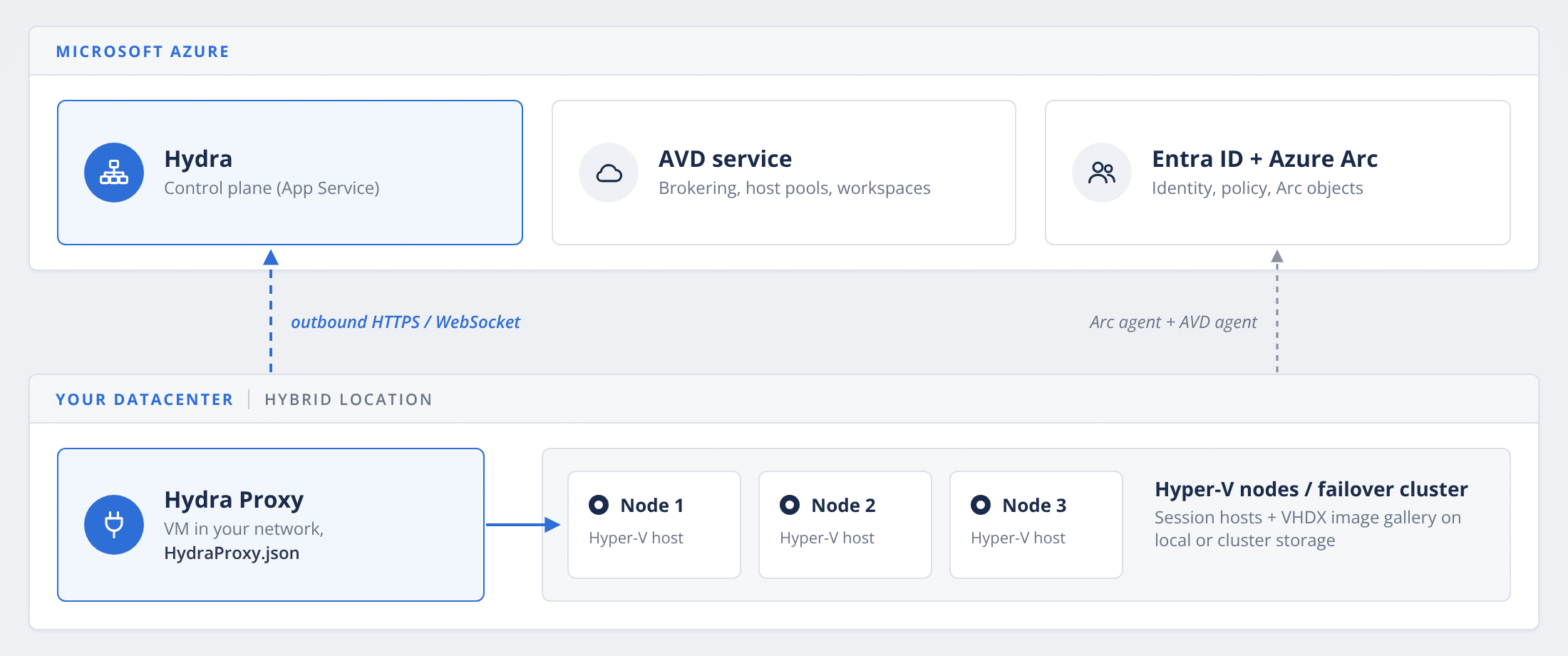
You click “add three hosts” in Hydra; the proxy builds them on your Hyper-V servers, installs everything they need and reports back. It also captures your golden images, and starts, stops and cleans up machines on command. One proxy can look after several sites, and a second one is there for peace of mind.
The best part for your security team: the proxy and the desktops only ever call out. Nothing in the cloud needs a way into your datacenter, so the firewall pitchforks can stay in the shed.
From Golden Image to Happy Users in Three Steps
- Connect your datacenter. Install the Hydra Proxy on a Windows Server and tell it which Hyper-V hosts or clusters it looks after. A one-time job.
- Capture your golden image. Pick your prepared master VM in Hydra and hit Create Image. Hydra turns it into a reusable image, no sysprep-and-copy marathon required.
- Roll out desktops. Choose the image, let Hydra pick the least busy host, and add as many session hosts as you need. Arc, the AVD agent and the domain join are all handled during rollout.
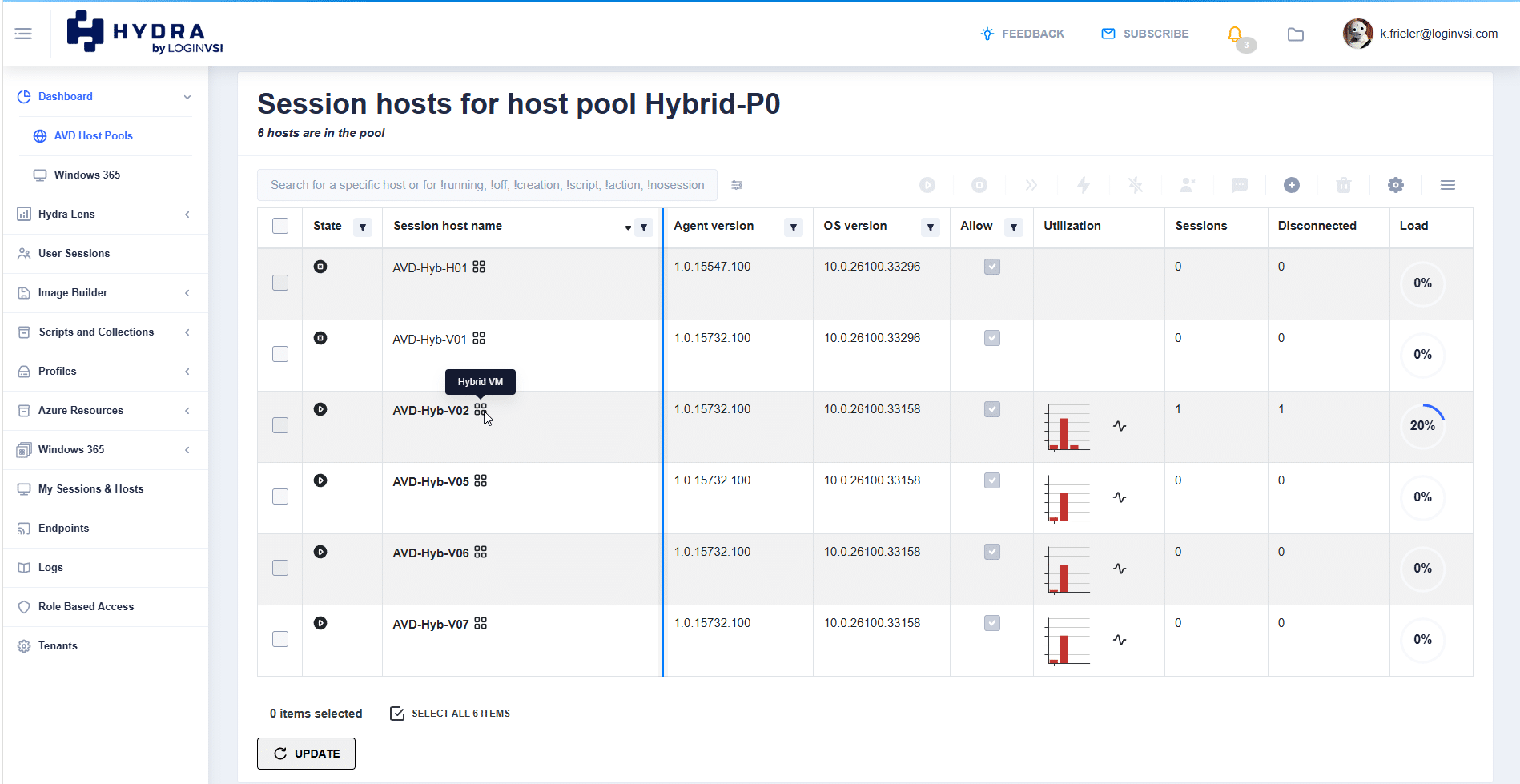
From then on, day two looks just like it does in Azure: start, stop, restart or retire hosts from the same screen.
One Console for Azure, Azure Local, and On-Prem AVD
The real win is not any single feature. It is that your on-prem desktops stop being the awkward cousin at the family dinner. They sit on the same dashboard as your Azure and Azure Local host pools and follow the same playbook.
- Put every workload where it fits. Sensitive desktops stay on Hyper-V, everyday users run in Azure, and GPU or multi-session heavy hitters go to Azure Local.
- Built for MSPs. Manage every customer as its own tenant. Give Access back by using the built-in RBAC Roles.
- See what users actually experience. Hydra Lens reports on connections, errors and network performance in one place.
- Let users help themselves. The Hydra User Portal shows users their sessions and hosts and connects them straight through Windows App.
The Fine Print (in Normal-Sized Font)
We like our customers happy and unsurprised, so here is what to know before you start:
- Hyper-V is ready today. Hydra support for AVD Hybrid on Hyper-V has been generally available since Hydra 2.8; VMware vSphere is in private preview.
- Azure Global only, for now. Government cloud tenants are not supported yet.
- Windows 11 multi-session is not on the menu. AVD Hybrid runs Windows Server or single-session Windows. Need multi-session on-prem? That is Azure Local, and Hydra manages that too.
Licensing is its own adventure. Besides the right OS entitlement, every user needs an AVD Hybrid license from Microsoft. Your licensing partner will be thrilled to hear from you.
Ready to Bring AVD Home?
Start small: one Hyper-V host, one proxy, one host pool and a few brave pilot users. Once that works, adding more hosts or a whole cluster is a configuration change, not a new project.
Your desktops get the cloud brains. Your datacenter keeps the muscle. And nobody has to babysit Hyper-V Manager at 2 a.m.
Hydra