

What’s New in Login Enterprise 6.9 | Workspace Weekly
October 2, 2026
Keeping Launchers updated and distributing custom connector files can become recurring work as your testing setup grows. When application failures increase, you also need to work out when they happened and where to investigate.
Login Enterprise 6.9 gives you more ways to manage Launcher maintenance from the Appliance. You can schedule restarts and updates through the UI, enable automatic updates, and manage custom connector files centrally. Continuous Test results also gain Application Execution details to help you review failures over time and compare them across tests.
Here’s where those changes can help.
Schedule Launcher Restarts and Updates from the UI
A Launcher restart might be routine, but someone still needs to arrange it around testing. Managing that across several machines takes time.
In 6.9, you can schedule Launcher application restarts, Launcher machine restarts, and Launcher updates directly in the Login Enterprise UI. Customers who used the Public API to schedule restarts in 6.8 now have a UI option.
Restarts support daily or weekly schedules, including multiple weekdays. Updates support those recurring options plus a one-time schedule. You select the Launchers the schedule applies to.
For example, if your overnight testing window ends at a predictable time, you can schedule a routine restart afterward. That removes the need for someone to log in early just to start it.
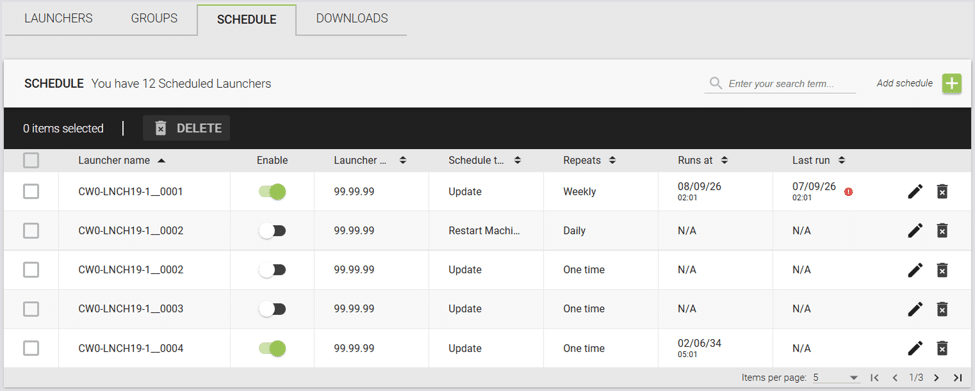
Figure 1: Scheduling a Launcher application or machine restart from the Login Enterprise UI.
Learn more: Configuring the Windows Launcher.
Keep Launchers Updated Automatically
Automatic Launcher updates are another addition in 6.9.
When enabled, a Launcher can update automatically when a newer Launcher version is available on the Appliance. If an update cannot proceed, such as when active sessions are running, the automatic update mechanism retries later.
For a team maintaining many Launchers, this reduces manual follow-up. A Launcher that is busy when the update first becomes available can be updated when conditions allow.
We recommend keeping Launcher and Appliance versions aligned. Check the release notes for specific Launcher update requirements and choose the update approach that fits your testing schedule.
Learn more: Updating the Launcher.
See When Application Failures Increase in Continuous Tests
An application failure count becomes more useful when you can see when those failures happened.
Login Enterprise 6.9 adds Application Execution details to Continuous Test results, including a bar chart showing application execution failures over time. You can also compare Application Execution details across multiple Continuous Tests.
Suppose you’re testing a proposed desktop image alongside the current image. Comparing the results can help you see whether failures increased in one tested environment or both. The timeline gives you a period to investigate alongside changes made in your environment.
Application Performance comparison, introduced in 6.8, remains available for reviewing performance measurements. The new Application Execution details give you another way to examine failures over time and across tests.
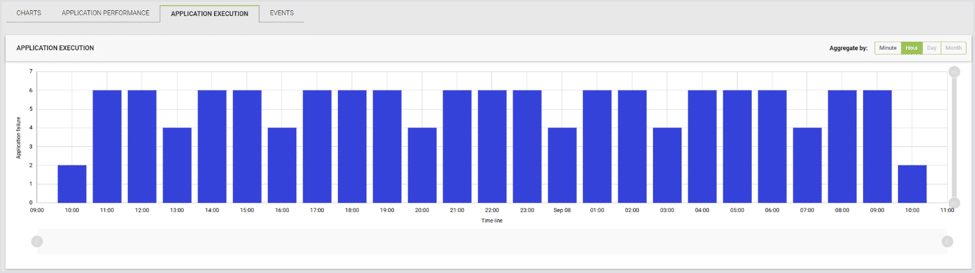
Figure 2: Application execution failures over time in Continuous Test results.
Learn more: Viewing Continuous Testing Results.
Manage Custom Connector Packages from the Appliance
Custom connectors can depend on scripts or binaries maintained on each Launcher. When those files change, distributing the updated copies becomes part of the testing work.
In 6.9, you can upload those files to the Appliance as a named ZIP package and select the package in a Test configuration. The Launcher downloads the package when needed and uses its contents to run the custom connector. Packages can be managed through the UI or Public API.
If several Launchers use the same custom connection script, you can replace the package contents on the Appliance. Tests referencing that package use the updated contents on their next run, removing the need to copy revised files to each Launcher individually.
Because a package can be shared, check which tests use it before replacing its contents.
Using packages is optional, so existing custom connector configurations can continue working as before. Launchers must be updated to v6.9 to use the package feature.
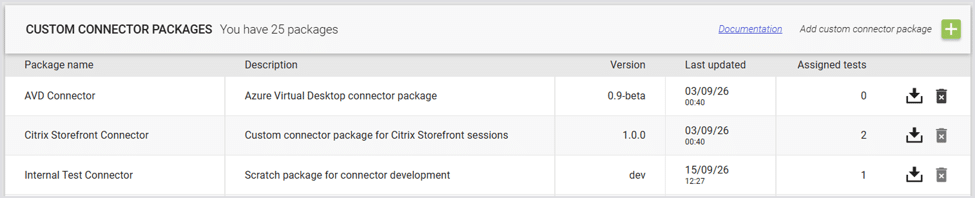
Figure 3: Managing reusable custom connector packages on the Appliance.
Learn more: Custom Connector Packages.
Other Improvements in Login Enterprise 6.9
The release also improves Web Recorder dropdown recording and playback, adds Public API capabilities for bulk deletion and Environment diagnostics, and includes further accessibility improvements. Other updates cover TLS profile configuration through the Appliance menu, Windows 365 connector compatibility, and Engine performance.
For the complete list of changes, fixes, and upgrade notices, see the Login Enterprise 6.9 release notes.
Get Started with Login Enterprise 6.9
Review the release notes and update guidance before upgrading, including Launcher version requirements. If you’re upgrading from a version older than 6.3, you must recreate existing API tokens.
To obtain installation files, visit Downloads. For an existing Appliance, follow Updating Login Enterprise, including the recommended snapshot step.
Start with a task you repeat today. Scheduling a routine restart or moving shared custom connector files into a package gives you a concrete place to begin.
If you’re exploring Login Enterprise, request a custom walkthrough with our team to discuss your testing needs.
Share your experience in the Login VSI Customer Slack, #workspace-weekly. You can find more practical examples in the Workspace Weekly hub.
Workspace Weekly