




Hydra is the Practical Way to Manage AVD and Windows 365
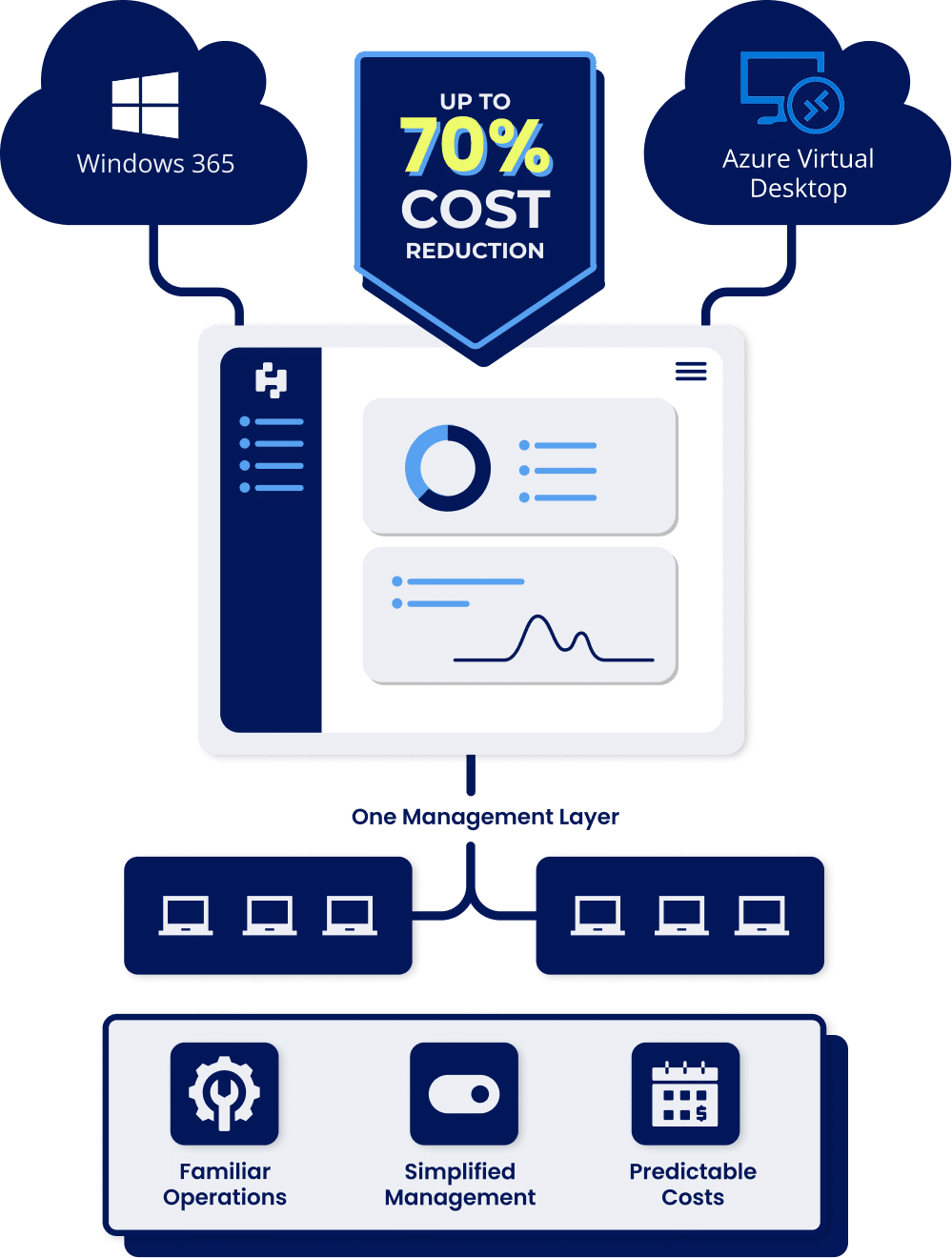
Running modern Microsoft virtual desktops shouldn’t create new operational problems. Hydra centralizes Azure Virtual Desktop (cloud and on-prem) and Windows 365 into one familiar management layer, so teams can run their workspaces efficiently without retraining or re-architecting. By aligning infrastructure usage to real demand and reducing operational overhead, Hydra lowers the total cost of AVD and Windows 365 environments by up to 70%.

|

|

|

|

|

|

|

|

|

|

|

|
Running AVD and Windows 365 Well Is Harder Than It Should Be
Organizations are rapidly adopting Azure Virtual Desktop and Windows 365 to modernize end-user computing. But while the platforms are powerful, operating them day-to-day can quickly become complex.
IT teams are expected to reduce costs, improve performance, and keep environments stable, all without disrupting day-to-day operations. As a result, many teams are rethinking both how they migrate to and manage AVD and Windows 365 over time.
Meet Hydra:
How AVD and Windows 365 Should Be Run
Hydra creates a familiar operational layer for Azure Virtual Desktop and Windows 365 by mirroring the workflows administrators already know from traditional VDI platforms like Citrix and Omnissa Horizon. Teams can be up and running in minutes, with zero onboarding fees and no retraining.
Simple to Adopt. Easy to Run.
Start managing AVD and Windows 365 immediately using workflows VDI teams already understand.
- Familiar and unified workspace for managing AVD and Windows 365 Cloud PCs
- No portal hopping across Azure, Intune and Microsoft 365 Admin Center
- Built around real VDI operational workflows
- Replace custom scripts and scattered Azure blades with repeatable actions
Predictable Costs Based on Reality
Usage-aligned pricing makes Hydra up to 40% more cost-efficient.
- Peak concurrent user pricing instead of charging for every user who logs in during the month
- Unlimited tenants and no per-tenant licensing fees
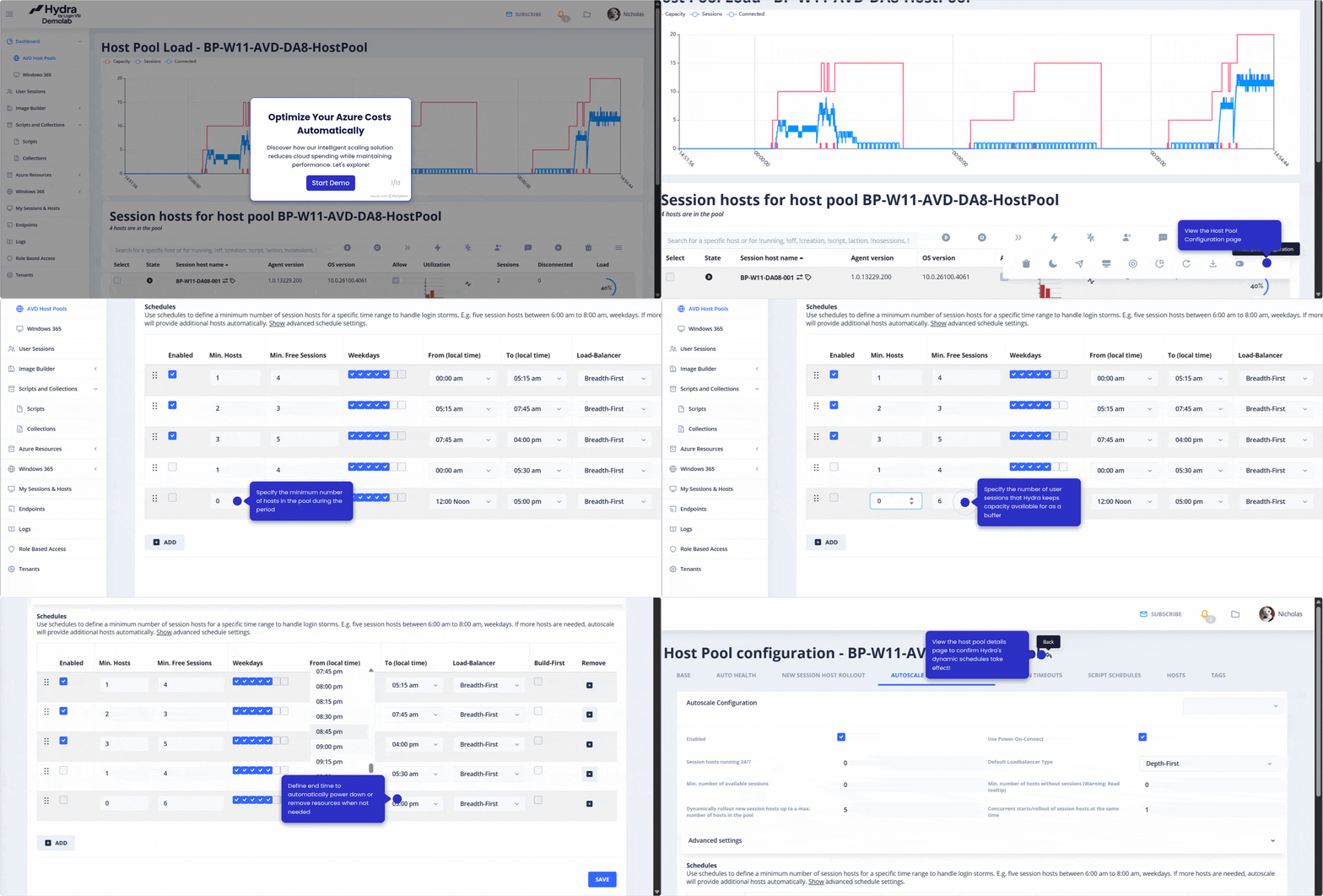
- Built-in AVD auto-scaling prevents paying for idle capacity
- Identify oversized or underpowered Windows 365 Cloud PCs and optimize licensing
- Burst protection handles temporary usage spikes without permanently increasing costs
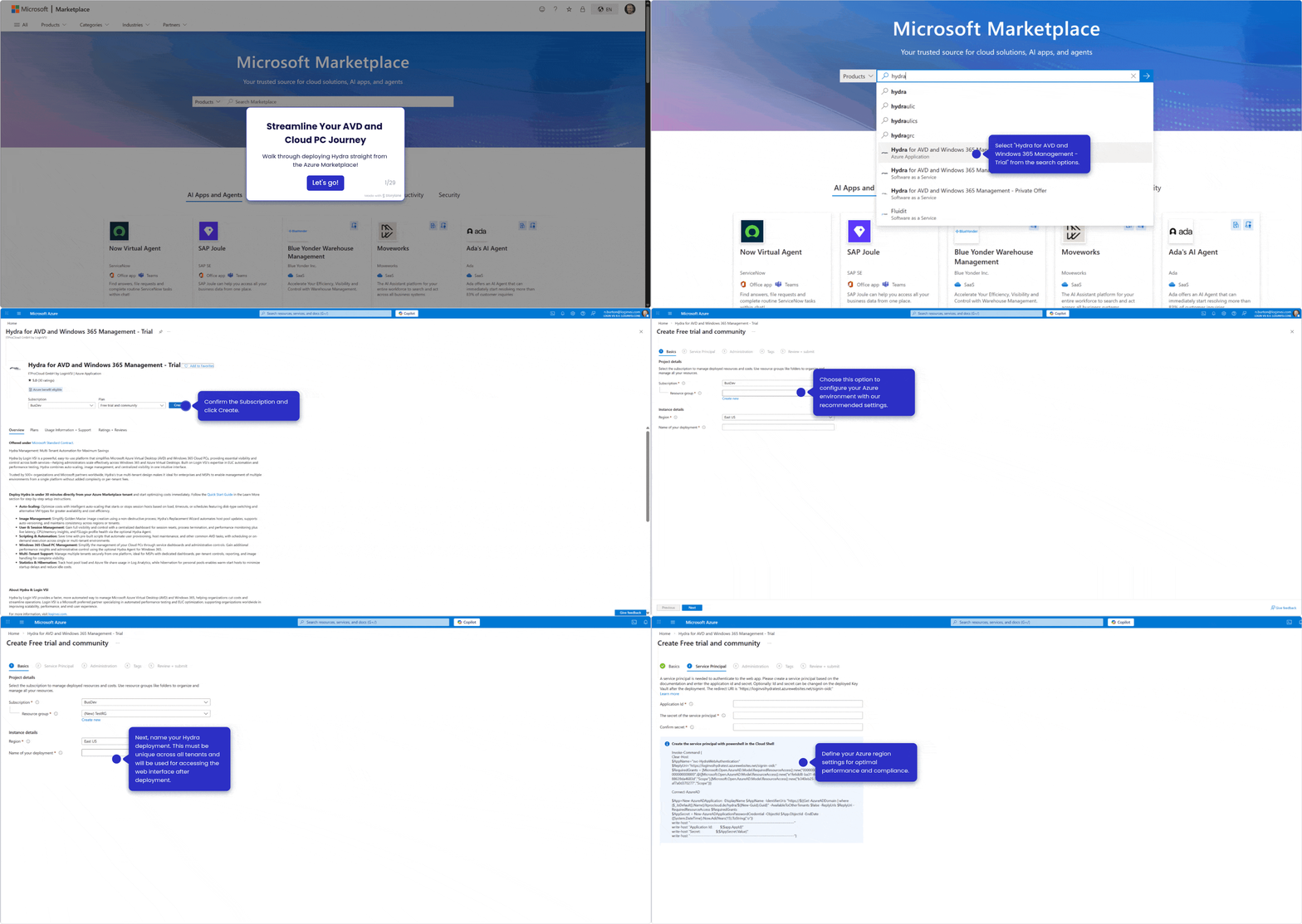
Live in Under 30 Minutes
Attach Hydra to your existing workspace and start managing immediately.
- Deployed in under 30 minutes with zero onboarding fees
- Connect to existing AVD and Windows 365 Cloud PC environments instantly
- No re-architecture or re-imaging required
Built for Enterprises and MSPs Alike
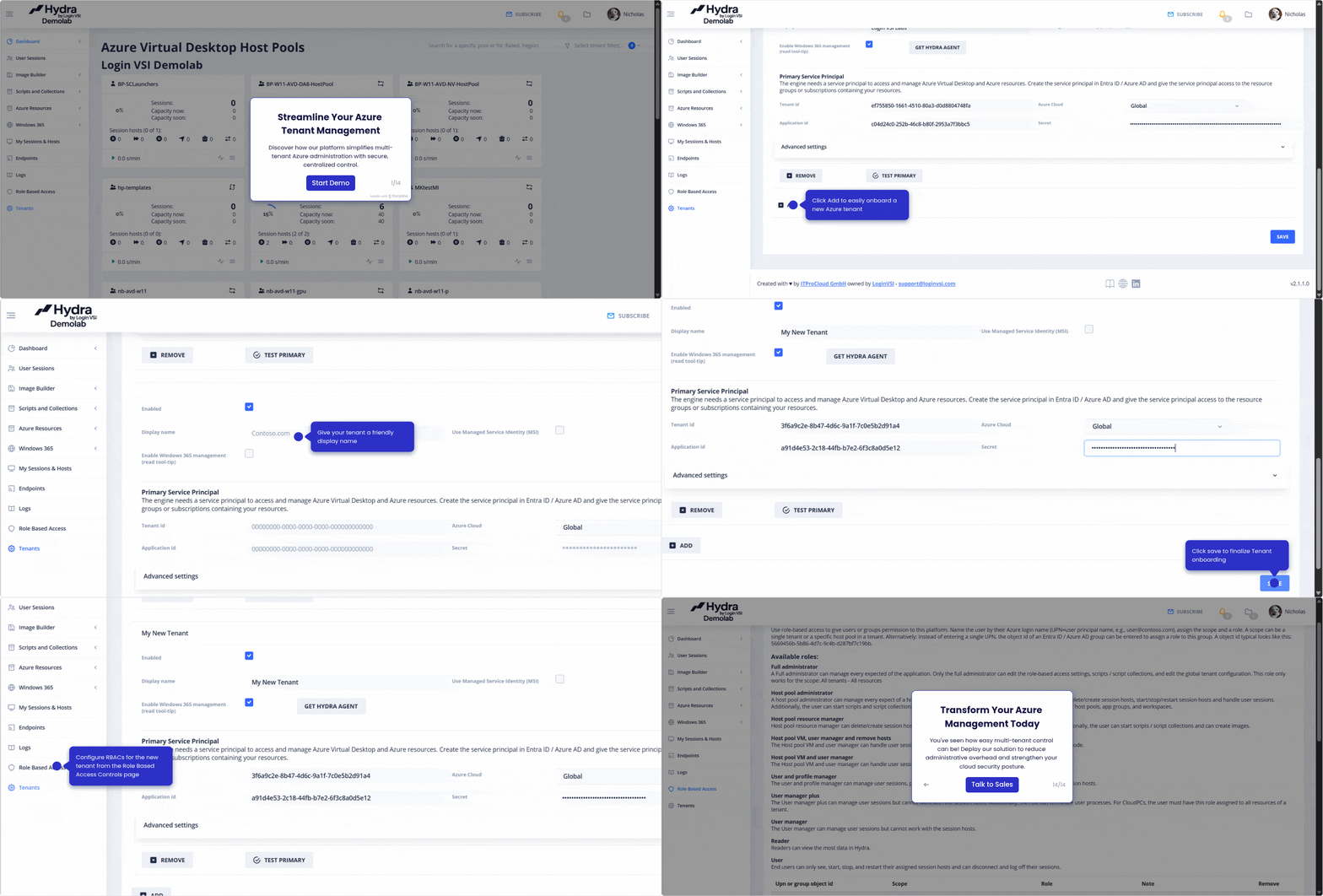
Manage large environments or multiple customers from a single control plane.
- Built-in at no extra cost
- Enterprise-grade RBAC scoped by tenant, host pool, or user group
- Manage multiple environments or customers from one interface
- Proven in large, regulated enterprise workspaces
- Dedicated enterprise-grade support
Agent-Based, Real-Time Visibility
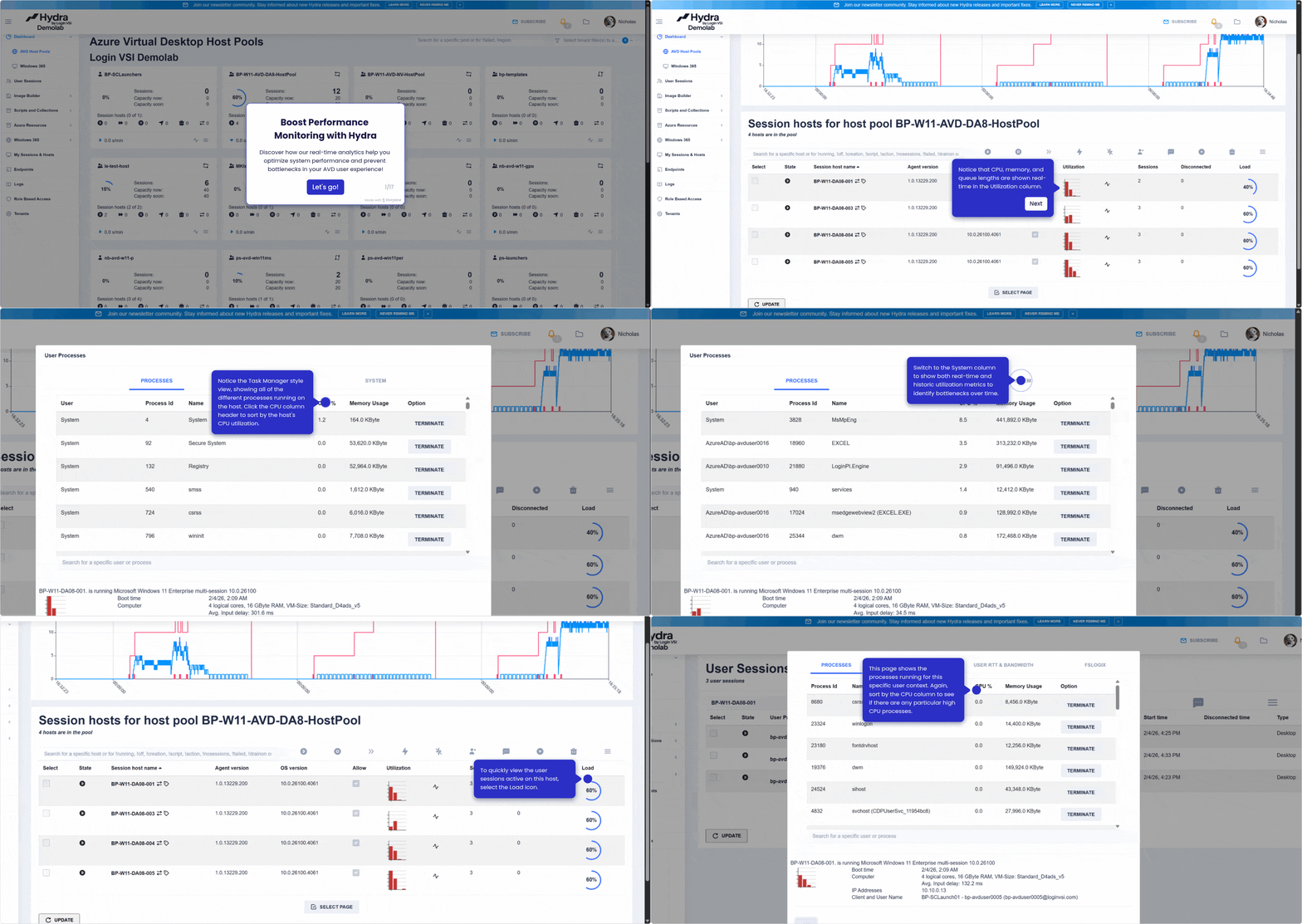
Live visibility and control that helps IT teams increase productivity by up to 75% and reduce MTTR by 70%.
- Lightweight Hydra agent runs directly on each VM or Cloud PC for live session insights
- Diagnose issues while users are actively connected
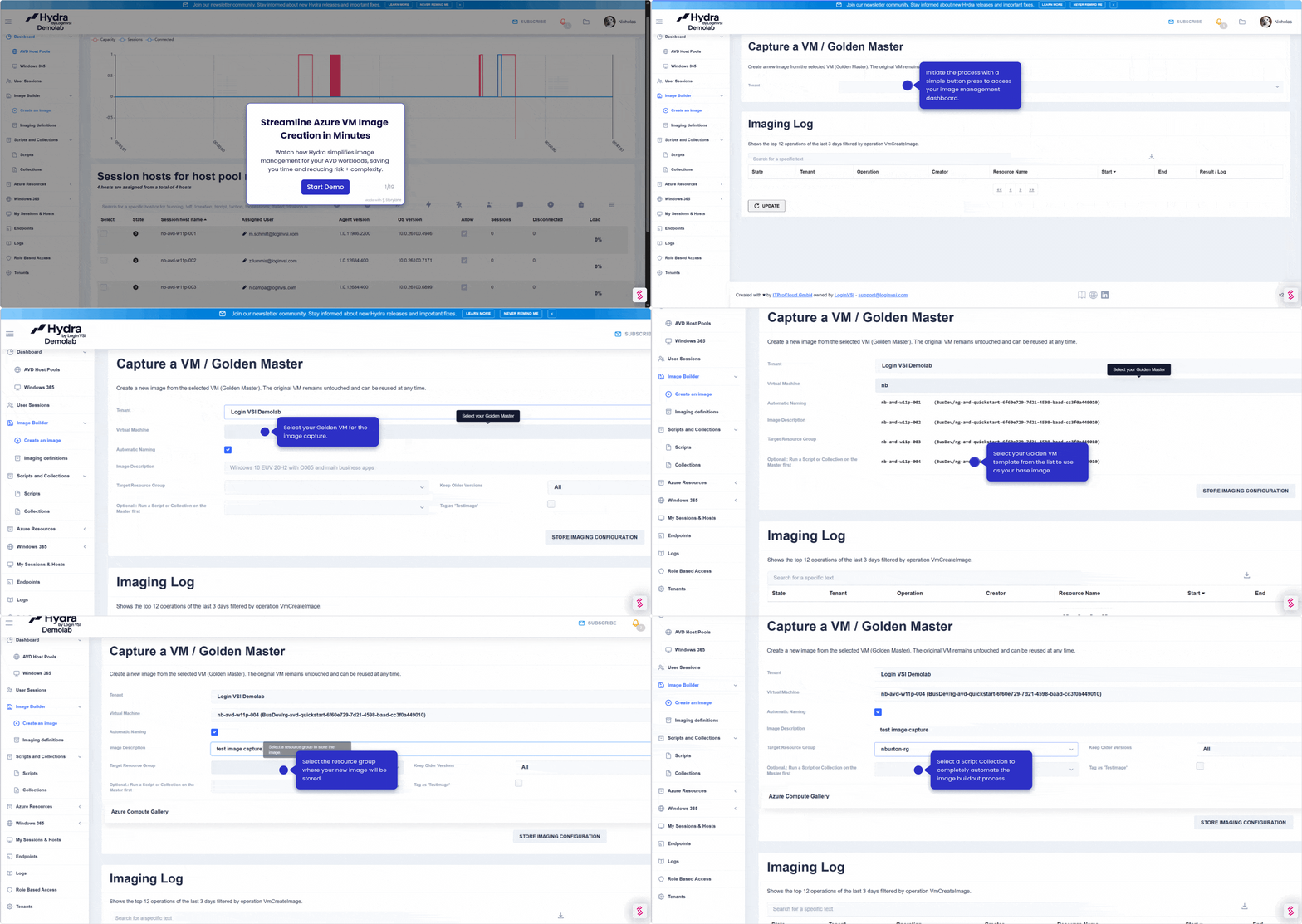
- One-click image lifecycle management with safe rollback
- Automate scaling, power schedules, draining, and reboots
What They’re Saying
See the Operational Impact
Use the Hydra ROI Calculator to estimate potential cost savings, operational time saved, and efficiency gains based on your exact workspace. With just a few inputs, you can model the impact of intelligent autoscaling and peak concurrent-user pricing on your workspace bill.
Many customers see a 60-70% cost reduction within the first month.
| Calculate Your Potential Savings → |
Built for Operators. Trusted by Leaders
For IT AdministratorsFaster Maintenance. Fewer Escalations.
|
For IT LeadersPredictable Costs. Faster Results.
|
In Their Words
Hydra for MSPs: Multi-Tenant, No Per-Tenant Fees
Built to Scale Your Customers, Not Your Costs
Hydra is multi-tenant by design, not by add-on. MSPs get the same enterprise-grade capabilities as large organizations without feature delays, per-tenant premiums, or forced margin tradeoffs.
|
|
|

|

|

|
Trusted at Enterprise Scale. Built on 15+ Years of EUC Expertise

Hydra was created by Marcel Meurer, a Germany-based EUC practitioner with over 20 years of experience running large-scale virtual desktop environments across Citrix, Azure, and enterprise VDI workspaces.
A Login VSI product, Hydra is backed by 15+ years of real-world EUC experience.
- German-built, European-founded
- Deployed in regulated, high-availability environments, including healthcare, finance, government, and legal
- ISO 27001 certified and GDPR compliant company
Trust, security, and operational reliability are foundational with Hydra, not add-ons.
Simplify AVD and Windows 365 Operations
Hydra provides a practical way to migrate to and manage Microsoft virtual desktops efficiently, with costs aligned to real usage and operations that stay simple even as your workspace grows.
FAQs
How is Hydra different from other Azure Virtual Desktop and Windows 365 management platforms?
Hydra is designed to simplify how Azure Virtual Desktop (AVD) and Windows 365 are actually operated day to day.
Operational simplicity
Other AVD and Windows 365 management platforms require rebuilding environments or adopting new operational models. Hydra attaches directly to existing environments and provides a single control plane for managing host pools, sessions, images, and scaling, so teams can start using it within minutes while keeping the workflows they already know and use.
Usage-aligned pricing
Alternative platforms price based on monthly active users (MAU), meaning every unique login during the month counts toward licensing. Hydra uses peak concurrent user pricing, so organizations pay only for the highest number of users connected at the same time. This aligns costs with real usage patterns like shift work, contractors, and seasonal access. See Hydra pricing for details.
Hydra supports both traditional pooled AVD desktops and Windows 365 Cloud PCs, allowing organizations to manage mixed environments from a single operational interface.
How is Hydra different from native Azure Virtual Desktop and Windows 365 management?
Native tooling typically requires administrators to manage AVD and Windows 365 through multiple portals, scripts, and manual workflows. Hydra simplifies this by providing a single management layer for AVD and Windows 365, allowing teams to manage host pools, Cloud PCs, sessions, scaling, and images without switching between portals or maintaining custom automation.
Hydra also adds capabilities that are difficult to manage with native tooling alone, including:
– Real-time session visibility through the Hydra agent
– Automation for routine operational tasks
– Centralized image lifecycle management
– Built-in autoscaling and power management
The result is faster operations, reduced administrative overhead, and a more predictable way to run AVD and Windows 365 at scale. Learn more in the Hydra solution overview.
How does Hydra reduce Azure Virtual Desktop and Windows 365 costs?
Hydra reduces costs for organizations in two primary ways: usage-aligned pricing and infrastructure optimization.
First, Hydra uses peak concurrent user pricing, meaning organizations pay only for the highest number of users connected at the same time during a billing period. This avoids the inflated licensing costs associated with monthly active user (MAU) pricing, where every individual login during the month counts toward licensing.
Example: If 2,000 users log in during the month but only 600 are active at once, MAU pricing charges for all 2,000. Hydra charges for 600, cutting costs by 70%.
Second, Hydra includes built-in autoscaling and power management for Azure Virtual Desktop, automatically adjusting infrastructure capacity based on real usage patterns. This prevents organizations from paying for idle compute resources when users are offline and can reduce monthly Azure infrastructure costs by up to 70%, based on Login VSI customer data.
For Windows 365 environments, Hydra provides centralized visibility into Cloud PC performance and usage so teams can identify oversized machines, underpowered users, or unused Cloud PCs that may be wasting license spend.
Together, these capabilities help organizations significantly reduce the total cost of running Azure Virtual Desktop and Windows 365 environments.
Can Hydra manage my existing workspace environment?
Yes. Hydra can attach to and assume operational control of existing Azure Virtual Desktop and Windows 365 environments without requiring re-architecture, re-imaging, or migration projects.
Once deployed, Hydra automatically discovers existing host pools, session hosts, Cloud PCs, and configurations. Teams can then begin managing those environments through Hydra immediately while keeping the underlying Microsoft infrastructure unchanged.
This allows organizations to adopt Hydra incrementally and without disruption, often becoming operational within minutes instead of weeks. Deploy directly from the Azure Marketplace, with no onboarding fees or environment rebuilds required.
What types of organizations use Hydra?
Hydra is designed for enterprises running or transitioning to Azure Virtual Desktop, Windows 365, AVD on Azure Local, or a hybrid mix. Typical organizations using Hydra include:
– Enterprise IT teams managing large Microsoft desktop environments
– Organizations migrating from legacy VDI platforms (Citrix, Omnissa Horizon) to Microsoft desktops
– Managed service providers (MSPs) operating multi-tenant AVD or Windows 365 environments
– Enterprises that need predictable cloud desktop costs without complex management tooling
Hydra is built for organizations that want operational simplicity, predictable costs, and familiar management workflows while modernizing their desktop infrastructure. MSPs should also see Hydra for MSPs for multi-tenant capabilities and pricing details.
Try Hydra today – start with a live demo and get onboarded within hours

Subscribe to The Hydra Dispatch: Cloud Desktop Updates
